A monitor may refer to any of the following:
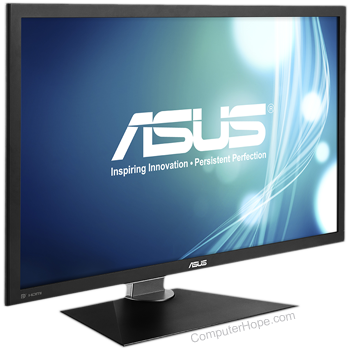
1. Alternatively referred to as a VDT (video display terminal) and VDU (video display unit), a monitor is an output device that displays video images and text. A monitor is made up of circuitry, a screen, a power supply, buttons to adjust screen settings, and casing that holds all of these components.
Like most early TVs, the first computer monitors were comprised of a CRT (cathode ray tube) and a fluorescent screen. Today, all monitors are created using flat-panel display technology, usually backlit with LEDs (light-emitting diode). The image is an example of an ASUS LCD (liquid-crystal display) monitor.
When was the first computer monitor invented?
The first computer monitor was part of the Xerox Alto computer system, which was released on March 1, 1973.
What are the different types of monitors?
There are essentially two types of monitors, with the second having two variations based on backlighting (CCFL vs. LED). The first (and oldest) is the CRT (cathode-ray tube) monitor, which was based on the same technology as early televisions. The second is the LCD (liquid-crystal display) monitor.
Why is a monitor an output device?
A traditional monitor is only used to display (output) information from a computer and provides no source of input. For this reason, a computer monitor is considered an output device.
Newer PCs, smartphones, and tablets have touch screens, which allow the user to interact with the computer using their finger. If the monitor has touch screen capabilities, it is considered an Input/Output devices. However, if it has no source of input it is only considered an output device.
Can a computer work without a monitor?
Yes. A computer does not require a monitor to work. However, for the user to interact with the computer's user interface (operating system) you'll need to use a monitor or another output device. Without a monitor or another output device, you have no method of determining what the computer is doing.
Types of monitor connections
Computer monitors have at least one of the following types of monitor connectors to connect to a computer.
Video adapters can convert one type of connector to another. For example, connecting DVI to VGA or HDMI to VGA, and vice versa.

2. When used as a verb, monitor is a term used to describe the act of watching over someone or something. For example, a parent may monitor what their child does on the Internet to make sure they're not doing anything they're not supposed to be doing. Other forms of monitoring can include monitoring network traffic, website visitors, e-mails for spam, and the performance of computer hardware.


No comments:
Post a Comment