Showing posts with label Computer Tips. Show all posts

Ransomware Attacks on the Rise: The Growing Threat to Businesses and Individuals


Introduction

In recent years, the digital landscape has become a battleground for a sinister form of cybercrime: ransomware attacks. These malicious incidents have surged, leaving organizations and individuals scrambling to protect their digital assets from extortionists. Ransomware attacks are not just on the rise; they have evolved into a formidable threat that demands our immediate attention and a multifaceted approach to cybersecurity.


The Ransomware Epidemic

Ransomware is a type of malware that encrypts a victim's data, rendering it inaccessible until a ransom is paid to the attacker, usually in cryptocurrency. The appeal of ransomware for cybercriminals lies in its potential for massive financial gains with relatively low risk. Recent years have seen a proliferation of ransomware strains, each more sophisticated and destructive than the last.


The Toll on Businesses

Businesses of all sizes have fallen victim to ransomware attacks. These attacks can cripple operations, disrupt supply chains, and lead to significant financial losses. In some cases, the reputational damage can be even more devastating than the monetary impact.

One of the most high-profile ransomware attacks in recent memory was the Colonial Pipeline incident in 2021, which led to fuel shortages and highlighted the real-world consequences of a successful cyberattack. Similarly, healthcare organizations have been targeted during the COVID-19 pandemic, putting patient lives at risk.


The Role of Evolving Tactics

Ransomware attacks have evolved beyond indiscriminate phishing emails. Cybercriminals now employ advanced tactics, such as spear-phishing campaigns that specifically target individuals within an organization, or they exploit unpatched vulnerabilities in software. These tactics increase the likelihood of a successful attack.


The Rise of Double Extortion

A concerning trend in ransomware attacks is the adoption of double extortion. In addition to encrypting data, attackers exfiltrate sensitive information before locking victims out of their systems. They threaten to release this data publicly if the ransom is not paid, which adds an extra layer of pressure on victims to comply.


The Costly Ransom Dilemma

Paying the ransom is a dilemma faced by many victims. While it may provide a quick solution to regain access to data, it also fuels the criminal ecosystem and offers no guarantee that the attacker will honor their end of the bargain. Furthermore, paying ransoms emboldens cybercriminals to target more victims.


Preventing Ransomware Attacks

The most effective way to deal with ransomware is to prevent it in the first place. Here are some proactive measures organizations and individuals can take:


1. **Regular Backups**: Maintain up-to-date backups of critical data offline or in a secure, isolated environment.

2. **Patch and Update**: Keep software and systems current with security patches and updates.

3. **Employee Training**: Train employees to recognize phishing attempts and practice safe online behavior.

4. **Endpoint Security**: Implement robust endpoint security solutions to detect and block malware.

5. **Network Segmentation**: Segment networks to limit lateral movement by attackers.

6. **Incident Response Plan**: Develop a comprehensive incident response plan to minimize damage in the event of an attack.


Conclusion

Ransomware attacks on the rise pose a clear and present danger to businesses and individuals alike. To combat this growing threat, we must adopt a proactive cybersecurity stance that combines technology, education, and vigilance. By implementing strong security measures, raising awareness, and fostering a culture of cyber resilience, we can stand strong against ransomware and protect our digital assets from falling into the hands of extortionists. The battle against ransomware is ongoing, and it's one that we cannot afford to lose.
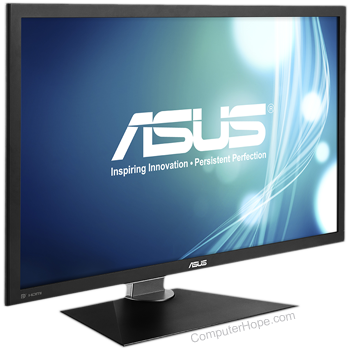
Monitor: BASIS OF A COMPUTER MONITOR

monitor may refer to any of the following:

Computer monitor

1. Alternatively referred to as a VDT (video display terminal) and VDU (video display unit), a monitor is an output device that displays video images and text. A monitor is made up of circuitry, a screen, a power supply, buttons to adjust screen settings, and casing that holds all of these components.

Tip

When used as a noun, the term "monitor" is synonymous with a computer "screen" and "display."

Like most early TVs, the first computer monitors were comprised of a CRT (cathode ray tube) and a fluorescent screen. Today, all monitors are created using flat-panel display technology, usually backlit with LEDs (light-emitting diode). The image is an example of an ASUS LCD (liquid-crystal display) monitor.

When was the first computer monitor invented?

The first computer monitor was part of the Xerox Alto computer system, which was released on March 1, 1973.

What are the different types of monitors?

There are essentially two types of monitors, with the second having two variations based on backlighting (CCFL vs. LED). The first (and oldest) is the CRT (cathode-ray tube) monitor, which was based on the same technology as early televisions. The second is the LCD (liquid-crystal display) monitor.

Why is a monitor an output device?

A traditional monitor is only used to display (output) information from a computer and provides no source of input. For this reason, a computer monitor is considered an output device.

Note

Newer PCs, smartphones, and tablets have touch screens, which allow the user to interact with the computer using their finger. If the monitor has touch screen capabilities, it is considered an Input/Output devices. However, if it has no source of input it is only considered an output device.

Can a computer work without a monitor?

Yes. A computer does not require a monitor to work. However, for the user to interact with the computer's user interface (operating system) you'll need to use a monitor or another output device. Without a monitor or another output device, you have no method of determining what the computer is doing.

Types of monitor connections

Computer monitors have at least one of the following types of monitor connectors to connect to a computer.

Tip

Video adapters can convert one type of connector to another. For example, connecting DVI to VGA or HDMI to VGA, and vice versa.

modern video ports

2. When used as a verb, monitor is a term used to describe the act of watching over someone or something. For example, a parent may monitor what their child does on the Internet to make sure they're not doing anything they're not supposed to be doing. Other forms of monitoring can include monitoring network traffic, website visitors, e-mails for spam, and the performance of computer hardware. 

What is DBMS (Database Management System)? Application, Types & Example


Before the introduction to Database Management System (DBMS), let’s understand-
What is a Database?
A database is a collection of related data which represents some aspect of the real world. A database system is designed to be built and populated with data for a certain task.

What is DBMS?
Database Management System (DBMS) is a software for storing and retrieving users’ data while considering appropriate security measures. It consists of a group of programs which manipulate the database. The DBMS accepts the request for data from an application and instructs the operating system to provide the specific data. In large systems, a DBMS helps users and other third-party software to store and retrieve data.

DBMS allows users to create their own databases as per their requirement. The term “DBMS” includes the user of the database and other application programs. It provides an interface between the data and the software application.

In this Database Management System tutorial tutorial, you will learn DBMS concepts like-

What is a Database?
What is Database Management System (DBMS)?
Example of a DBMS
History of DBMS
Characteristics of Database Management System
DBMS vs. Flat File
Users in a DBMS environment
Popular DBMS Software
Application of DBMS
Types of DBMS
Advantages of DBMS
Disadvantage of DBMS
When not to use a DBMS system?
Example of a DBMS


Let us see a simple example of a university database. This database is maintaining information concerning students, courses, and grades in a university environment. The database is organized as five files:

  • The STUDENT file stores data of each student
  • The COURSE file stores contain data on each course.
  • The SECTION stores the information about sections in a particular course.
  • The GRADE file stores the grades which students receive in the various sections
  • The TUTOR file contains information about each professor.


We need to specify the structure of the records of each file by defining the different types of data elements to be stored in each record.
We can also use a coding scheme to represent the values of a data item.
Basically, your Database will have 5 tables with a foreign key defined amongst the various tables.

History of DBMS

Here, are the important landmarks from the history:
  • 1960 – Charles Bachman designed first DBMS system
  • 1970 – Codd introduced IBM’S Information Management System (IMS)
  • 1976- Peter Chen coined and defined the Entity-relationship model also know as the ER model
  • 1980 – Relational Model becomes a widely accepted database component
  • 1985- Object-oriented DBMS develops.
  • 1990s- Incorporation of object-orientation in relational DBMS.
  • 1991- Microsoft ships MS access, a personal DBMS and that displaces all other personal DBMS products.
  • 1995: First Internet database applications
  • 1997: XML applied to database processing. Many vendors begin to integrate XML into DBMS product
Characteristics of Database Management System
Here are the characteristics and properties of Database Management System:

  • Provides security and removes redundancy
  • Self-describing nature of a database system
  • Insulation between programs and data abstraction
  • Support of multiple views of the data
  • Sharing of data and multiuser transaction processing
  • Database Management Software allows entities and relations among them to form tables.
  • It follows the ACID concept ( Atomicity, Consistency, Isolation, and Durability).
  • DBMS supports multi-user environment that allows users to access and manipulate data in parallel.
DBMS vs. Flat File
DBMS Flat File Management System
Multi-user access It does not support multi-user access
Design to fulfill the need for small and large businesses It is only limited to smaller DBMS system.
Remove redundancy and Integrity Redundancy and Integrity issues
Expensive. But in the long term Total Cost of Ownership is cheap It’s cheaper
Easy to implement complicated transactions No support for complicated transactions
Users in a DBMS environment
Following, are the various category of users of a DBMS system

Component Name Task
Application Programmers The Application programmers write programs in various programming languages to interact with databases.
Database Administrators Database Admin is responsible for managing the entire DBMS system. He/She is called Database admin or DBA.
End-Users The end users are the people who interact with the database management system. They conduct various operations on database like retrieving, updating, deleting, etc.

Popular DBMS Software
Here, is the list of some popular DBMS system:

MySQL
Microsoft Access
Oracle
PostgreSQL
dBASE
FoxPro
SQLite
IBM DB2
LibreOffice Base
MariaDB
Microsoft SQL Server etc.
Application of DBMS
Below are the popular database system applications:

Sector Use of DBMS
Banking     For customer information, account activities, payments, deposits, loans, etc.
Airlines     For reservations and schedule information.
Universities For student information, course registrations, colleges and grades.
Telecommunication It helps to keep call records, monthly bills, maintaining balances, etc.
Finance     For storing information about stock, sales, and purchases of financial instruments like stocks and bonds.
Sales     Use for storing customer, product & sales information.
Manufacturing It is used for the management of supply chain and for tracking production of items. Inventories status in warehouses.
HR Management For information about employees, salaries, payroll, deduction, generation of paychecks, etc.
Types of DBMS

Types of DBMS
Tha main Four Types of Database Management System are:

Hierarchical database
Network database
Relational database
Object-Oriented database
Hierarchical DBMS
In a Hierarchical database, model data is organized in a tree-like structure. Data is Stored Hierarchically (top down or bottom up) format. Data is represented using a parent-child relationship. In Hierarchical DBMS parent may have many children, but children have only one parent.

Network Model
The network database model allows each child to have multiple parents. It helps you to address the need to model more complex relationships like as the orders/parts many-to-many relationship. In this model, entities are organized in a graph which can be accessed through several paths.

Relational Model
Relational DBMS is the most widely used DBMS model because it is one of the easiest. This model is based on normalizing data in the rows and columns of the tables. Relational model stored in fixed structures and manipulated using SQL.

Object-Oriented Model
In Object-oriented Model data stored in the form of objects. The structure which is called classes which display data within it. It is one of the components of DBMS that defines a database as a collection of objects which stores both data members values and operations.

ECOWAS Cybersecurity Hackathon 2024

  The highly anticipated Cybersecurity Hackathon for 2024 has been announced by the Economic Community of West African States (ECOWAS). This...