A fast growing information and communication technology company with an unequalled strategy in the service delivery using globally acceptable application development standards and project management methodology and process. We specialize in delivering professional website and software development to our clients worldwide at affordable prices.
edusvic_home-ad-top1_AdSense3_1x1_as
1. Alternatively referred to as a VDT (video display terminal) and VDU (video display unit), a monitor is an output device that displays video images and text. A monitor is made up of circuitry, a screen, a power supply, buttons to adjust screen settings, and casing that holds all of these components.
Tip
When used as a noun, the term "monitor" is synonymous with a computer "screen" and "display."
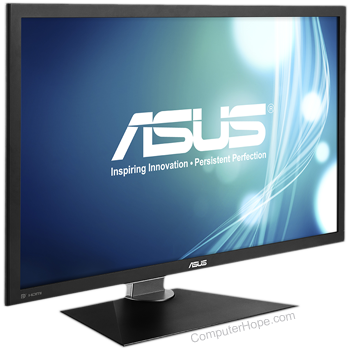
Like most early TVs, the first computer monitors were comprised of a CRT (cathode ray tube) and a fluorescent screen. Today, all monitors are created using flat-panel display technology, usually backlit with LEDs (light-emitting diode). The image is an example of an ASUS LCD (liquid-crystal display) monitor.
There are essentially two types of monitors, with the second having two variations based on backlighting (CCFL vs. LED). The first (and oldest) is the CRT (cathode-ray tube) monitor, which was based on the same technology as early televisions. The second is the LCD (liquid-crystal display) monitor.
Why is a monitor an output device?
A traditional monitor is only used to display (output) information from a computer and provides no source of input. For this reason, a computer monitor is considered an output device.
Note
Newer PCs, smartphones, and tablets have touch screens, which allow the user to interact with the computer using their finger. If the monitor has touch screen capabilities, it is considered an Input/Output devices. However, if it has no source of input it is only considered an output device.
Can a computer work without a monitor?
Yes. A computer does not require a monitor to work. However, for the user to interact with the computer's user interface (operating system) you'll need to use a monitor or another output device. Without a monitor or another output device, you have no method of determining what the computer is doing.
Types of monitor connections
Computer monitors have at least one of the following types of monitor connectors to connect to a computer.
Tip
Video adapters can convert one type of connector to another. For example, connecting DVI to VGA or HDMI to VGA, and vice versa.
2.When used as a verb,monitoris a term used to describe the act of watching over someone or something. For example, a parent may monitor what their child does on theInternetto make sure they're not doing anything they're not supposed to be doing. Other forms of monitoring can include monitoring networktraffic, websitevisitors,e-mailsforspam, and the performance of computerhardware.
Before the introduction to Database Management System (DBMS), let’s understand-
What is a Database?
A database is a collection of related data which represents some aspect of the real world. A database system is designed to be built and populated with data for a certain task.
What is DBMS?
Database Management System (DBMS) is a software for storing and retrieving users’ data while considering appropriate security measures. It consists of a group of programs which manipulate the database. The DBMS accepts the request for data from an application and instructs the operating system to provide the specific data. In large systems, a DBMS helps users and other third-party software to store and retrieve data.
DBMS allows users to create their own databases as per their requirement. The term “DBMS” includes the user of the database and other application programs. It provides an interface between the data and the software application.
In this Database Management System tutorial tutorial, you will learn DBMS concepts like-
What is a Database?
What is Database Management System (DBMS)?
Example of a DBMS
History of DBMS
Characteristics of Database Management System
DBMS vs. Flat File
Users in a DBMS environment
Popular DBMS Software
Application of DBMS
Types of DBMS
Advantages of DBMS
Disadvantage of DBMS
When not to use a DBMS system?
Example of a DBMS
Let us see a simple example of a university database. This database is maintaining information concerning students, courses, and grades in a university environment. The database is organized as five files:
The STUDENT file stores data of each student
The COURSE file stores contain data on each course.
The SECTION stores the information about sections in a particular course.
The GRADE file stores the grades which students receive in the various sections
The TUTOR file contains information about each professor.
We need to specify the structure of the records of each file by defining the different types of data elements to be stored in each record.
We can also use a coding scheme to represent the values of a data item.
Basically, your Database will have 5 tables with a foreign key defined amongst the various tables.
History of DBMS
Here, are the important landmarks from the history:
1960 – Charles Bachman designed first DBMS system
1970 – Codd introduced IBM’S Information Management System (IMS)
1976- Peter Chen coined and defined the Entity-relationship model also know as the ER model
1980 – Relational Model becomes a widely accepted database component
1985- Object-oriented DBMS develops.
1990s- Incorporation of object-orientation in relational DBMS.
1991- Microsoft ships MS access, a personal DBMS and that displaces all other personal DBMS products.
1995: First Internet database applications
1997: XML applied to database processing. Many vendors begin to integrate XML into DBMS product
Characteristics of Database Management System
Here are the characteristics and properties of Database Management System:
Provides security and removes redundancy
Self-describing nature of a database system
Insulation between programs and data abstraction
Support of multiple views of the data
Sharing of data and multiuser transaction processing
Database Management Software allows entities and relations among them to form tables.
It follows the ACID concept ( Atomicity, Consistency, Isolation, and Durability).
DBMS supports multi-user environment that allows users to access and manipulate data in parallel.
DBMS vs. Flat File
DBMSFlat File Management System
Multi-user accessIt does not support multi-user access
Design to fulfill the need for small and large businessesIt is only limited to smaller DBMS system.
Remove redundancy and IntegrityRedundancy and Integrity issues
Expensive. But in the long term Total Cost of Ownership is cheapIt’s cheaper
Easy to implement complicated transactionsNo support for complicated transactions
Users in a DBMS environment
Following, are the various category of users of a DBMS system
Component NameTask
Application ProgrammersThe Application programmers write programs in various programming languages to interact with databases.
Database AdministratorsDatabase Admin is responsible for managing the entire DBMS system. He/She is called Database admin or DBA.
End-UsersThe end users are the people who interact with the database management system. They conduct various operations on database like retrieving, updating, deleting, etc.
Popular DBMS Software
Here, is the list of some popular DBMS system:
MySQL
Microsoft Access
Oracle
PostgreSQL
dBASE
FoxPro
SQLite
IBM DB2
LibreOffice Base
MariaDB
Microsoft SQL Server etc.
Application of DBMS
Below are the popular database system applications:
SectorUse of DBMS
BankingFor customer information, account activities, payments, deposits, loans, etc.
AirlinesFor reservations and schedule information.
UniversitiesFor student information, course registrations, colleges and grades.
TelecommunicationIt helps to keep call records, monthly bills, maintaining balances, etc.
FinanceFor storing information about stock, sales, and purchases of financial instruments like stocks and bonds.
SalesUse for storing customer, product & sales information.
ManufacturingIt is used for the management of supply chain and for tracking production of items. Inventories status in warehouses.
HR ManagementFor information about employees, salaries, payroll, deduction, generation of paychecks, etc.
Types of DBMS
Types of DBMS
Tha main Four Types of Database Management System are:
Hierarchical database
Network database
Relational database
Object-Oriented database
Hierarchical DBMS
In a Hierarchical database, model data is organized in a tree-like structure. Data is Stored Hierarchically (top down or bottom up) format. Data is represented using a parent-child relationship. In Hierarchical DBMS parent may have many children, but children have only one parent.
Network Model
The network database model allows each child to have multiple parents. It helps you to address the need to model more complex relationships like as the orders/parts many-to-many relationship. In this model, entities are organized in a graph which can be accessed through several paths.
Relational Model
Relational DBMS is the most widely used DBMS model because it is one of the easiest. This model is based on normalizing data in the rows and columns of the tables. Relational model stored in fixed structures and manipulated using SQL.
Object-Oriented Model
In Object-oriented Model data stored in the form of objects. The structure which is called classes which display data within it. It is one of the components of DBMS that defines a database as a collection of objects which stores both data members values and operations.
When your computer breaks down, or when you need to upgrade to a new faster machine, you may think that buying a new PC will solve the problem, but that's not always enough. As it turns out, a modern PC may not support your old storage devices.
If you build a PC yourself, you can still choose one of several great cases with 5.25" bays for optical drives, but if you buy a pre-built desktop, chances are it won't have such a bay. If you are hoping to recover data from your older hard drives or even floppies (yea, seriously), you may also find out that you can't connect them to your motherboard.
Likewise, if you buy a laptop, a mini PC or an all-in-one today, not only it won't have an optical drive, but it may also not support the SATA drive from your old computer, or come with a full-size SD card reader. With this guide, you'll learn about the different ways to connect your old storage drives to a new computer.
External Optical Drives
With CDs, DVDs and Blu-ray discs still somewhat commonplace, many companies sell external CD/DVD drives. The question is, which should you buy?
For $30, there's a well-reviewed generic option on Amazon that offers everything that you need in a CD/DVD drive and nothing that you don't: the double-headed USB cable supports both Type-A and Type-C connectors. With an extra power cable, the device is compatible with low-power devices such as the Surface Pro 8. The device supports Windows, macOS and Linux, and comes with your choice of a black or grey padded case.
Blu-ray drives are more expensive, and are sold by better-known companies. For $90, LG sells a compact device that can write at 6X speeds. If you value speed over portability, Asus has a drive that can write at 16X speeds for $125.
External Enclosures for Internal Disk Drives
If you can't install your old SATA drive inside your new PC, you can still use it as an external drive. If you have a standard USB port, you can do it with any 2.5" SSD or HDD for just $10 with Sabrent's enclosure. If you only have USB-C, or want a higher-quality product, you should get Ugreen's aluminum-made enclosure instead for $21.
If you have a 3.5" HDD, you'll need to get a larger enclosure with an additional power connector. Orico has one for $23, and Sabrent has one with a fan for $29. Once again, Ugreen has an aluminum/Type-C option, for $32.
If you already have an old M.2 SSD that you want to turn into an external one, then SSK's aluminum enclosures are the best option for you, with both Type-A and Type-C cables. The SATA version is $14, while the NVMe version is $20 (or $17 with a coupon).
External SD Card Readers
If your computer doesn't have a full-size SD card reader, the solution may be cheaper than you think...
For a mere $9, Vanja sells a device that's basically two slots (SD and microSD) and two USB 2.0 connectors (Type-A and Type-C), which are fast enough for any non-UHS SD card. If you want to use either slot for faster cards as well, the USB 3.0 version is $16.
External Floppy Drives
USB floppy drives look like something that shouldn't exist: after all, USB is the connector that allowed disk-on-keys to completely replace floppies at the beginning of the century. Yet, with the inability to connect an internal floppy drive to a modern motherboard, USB drives are the easiest way to use your old floppy disks with your new computer.
There are various companies selling external floppy drives, but except for the logo, most of them are possibly identical, so your choice should come down to price and seller reliability. At the time of writing, "Raayoo" looks like a good option for $19.
You probably won't find a USB-C floppy drive, so if your computer doesn't have USB-A, you should buy an adapter such as Syntech's ($10 for a pack of 2).
Parallel ATA (PATA) to PCIe/USB Adapters
If you don't recognize the connector on your old hard drive, then it's probably PATA, also known as IDE (among other names), which was replaced by SATA around the time floppy disks stopped being popular. In order to install the drive inside a modern desktop PC, you'll need to use one of your PCIe slots for an adapter.
Startech sells such an adapter for $23. It only uses one PCIe lane, and can be installed even in the shortest PCIe slots. You can screw it to the case, but it weights so little that you may not even need to.
Other companies sell adapters that basically turn PATA drives into SATA for less, but we don't recommend them as they are complicated to install and can create physical compatibility issues with drive cages. If you don't have a desktop PC with an available PCIe slot, you'll need to use an external adapter kit such as Vantec's ($20).
Be aware, though: it doesn't include a protective case for the drive, and if the drive has no space at all between the PATA and power connectors, you won't be able to use it.
Dutch police say they have detained a couple who escaped from a Covid-quarantine hotel.
The arrests were made on a plane in Amsterdam's Schiphol airport just before it departed to Spain on Sunday.
The Spanish man and Portuguese woman were later handed over to the country's health service, local media reported.
It comes after 13 people who arrived in Amsterdam on two flights from South Africa last week tested positive for the new coronavirus variant.
They are among 61 passengers who tested positive for Covid.
It is not known whether the detained couple were among those passengers.
Local media are reporting that they managed to flee a quarantine hotel in the north-western Kennemerland region, where travellers from South Africa are currently in self-isolation.
The escapees could be prosecuted for violating Dutch quarantine rules, De Telegraaf newspaper says.
An extended partial lockdown came into force on Sunday morning across the Netherlands, amid record Covid cases and concerns over the new variant.
Bars, restaurants and shops - whose opening hours have already been restricted for several weeks - are required to close earlier than before, and there is a limit on the number of guests allowed in homes.
People are also being encouraged to work from home where possible, but nurseries, schools and universities across the country remain open.
Thousands of people protested after the measures were announced earlier this month.
The Netherlands has had nearly 20,000 confirmed Covid-related deaths since the pandemic started. But data shows the country has recorded 1,124 deaths per million of its population, one of the lowest numbers in western Europe.
Omicron was first reported to the World Health Organization (WHO) by South Africa on Wednesday, and early evidence suggests it has a higher re-infection risk. It has been categorised by the WHO as a "variant of concern".
Stephen Curry inspired the Golden State Warriors to a seventh straight victory as he scored 33 points in a 105-90 win over the Los Angeles Clippers.
Curry scored seven three pointers to take his tally to 105 in 19 games.
In doing so, he broke his own record for the fastest player to reach 100 three pointers in a season.
The Warriors, who have the best record in the NBA with 18 wins and two losses, next play the Phoenix Suns, who have won their past 16 games.
Curry scored 13 points, which included a burst of scoring after he felt aggrieved at not being awarded a foul, in the fourth quarter.
"I thought I got fouled so I wanted to let the emotions out and then you let it go and then you just play basketball," said Curry.
"For me individually and for our team, I think we fuelled off of that and just worried about putting the ball in the basket and that's when the avalanche started."
LeBron James also scored 33 points to help Los Angeles Lakers beat the Detroit Pistons 110-106, while Giannis Antetokounmpo contributed 26 points and 13 rebounds for the Milwaukee Bucks as they earned a 118-100 victory over the Indiana Pacers.
The Memphis Grizzlies, helped by 21 points from Dillon Brooks, saw off the Sacramento Kings 128-101 and the Boston Celtics registered a fourth win in six games with a 109-97 victory over the Toronto Raptors.
Hydrogen water generators add hydrogen to your natural water. In these devices, electricity, and vibration helps produce water that is rich in hydrogen. Besides, this type of device involves the electromechanical production of hydrogen-rich water droplets. This process is called ultrasonic atomizing. Let's take a look at some of the benefits of hydrogen water.
Is Hydrogen Water Healthy for the Skin?
First of all, it is essential to keep in mind that hydrogen is a powerful antioxidant due to its microscopic size. As a matter of fact, hydrogen is a tiny molecule that can penetrate inside your deep scan tissue. If you want to understand it better, know that the vitamin E molecule is 400 times bigger than the hydrogen molecule.
Quick Absorption and Hydration
After your skin absorbs hydrogen molecules, you can experience gene regulation. Apart from this, this process can also silence your negative geans. Besides, it can target and neutralize your muscle inflammation due to free radicals. Other causes of muscle inflammation are exposure to UVB rays, pollution, lack of sleep, a healthy diet, and stress.
What happens is that hydrogen gets into the nucleus and mitochondria of your cell. As a result, it successfully neutralizes the free radicals. When a free radical is neutralized, it turns into ascorbyl. In other words, it becomes a passive free radical that may still cause a little bit of damage to your skin. At the end of the process, you can enjoy vibrant and youthful skin.
4 Benefits of Hydrogen Water
Without further ado, let's take a look at some of the primary benefits of using hydrogen water.
1. Anti-Aging
Molecular hydrogen is an antioxidant that can protect your cells and genes against harmful free radicals. Since it has a lot of anti-inflammatory properties, it can help reduce oxidative stress, inflammation. Plus, it speeds up your tissue regeneration and improves skin longevity. If you have a reduced level of oxidative stress, you can protect your tissue.
Since your skin can absorb hydrogen water pretty quickly, you can get rid of inflammation and free radicals. And this process can help you fight wrinkles, fine lines, and skin dryness. And you will have youthful skin.
2. Anti-Inflammatory
Molecular hydrogen may also improve the condition of your skin. It reduces inflammation and helps relieve different types of skin diseases. Some of the diseases include eczema and psoriasis. As a matter of fact, if you suffer from psoriasis, you can enjoy 75% improvement by consuming hydrogen-rich water.
3. Fights Acne
Hydrogen has a lot of wound healing and antibacterial properties. Therefore, it is considered one of the most effective treatments against acne. Therefore. It can revitalize your skin's health and makes your skin glow like stars.
4. Youthful Appearance
So, you can see that hydrogen water is full of nourishment for your skin. So, you may want to use a hydrogen water sprayer in order to enjoy all of these benefits. The good thing about this unit is that you can use cool or lukewarm water based on the type of therapy you want to benefit from. For example, you can use hydrogen or electrolysis therapy to cover your needs.
We suggest that you use lukewarm water before you exfoliate your skin. Using warm water, you can open up your skin pores and get rid of dead cells and different types of harmful microorganisms, such as bacteria.
In short, these are just some of the benefits of hydrogen water. If you want to reap this benefit, we suggest that you get a good quality hydrogen water sprayer.
At Olansi China, you can find a good hydrogen water sprayer. These devices can be found at https://www.olansichina.com/hydrogen-water-sprayer.html.
Black Friday is one of the biggest shopping days of the year. It signals the unofficial start of the holiday buying season for many, highlighted by deep discounts and doorbuster sales that often can only be found during this time of year.
HP’s Black Friday sale is in full swing, and we’ve singled out several of our favorite deals. Whether it’s a new laptop, desktop, monitor or input device, HP likely has something to meet your needs at a great price. With this year expected to be even more hectic than usual due to global supply constraints, it might not be a bad idea to shop early and take advantage of some great offers while they last.
HP’s holiday sales have historically been anchored by a plethora of laptop deals, and this year is no different with bargains across mainstream machines, gaming-focused laptops and business-class portables.
The HP Pavilion 15t-eg100 immediately caught our attention. This portable features a 15.6-inch FHD (1,920 x 1,080 resolution) IPS micro-edge display that’s powered by an Intel Core i5-1157G processor with Intel Iris Xe graphics along with 8GB of DDR4 RAM (2x 4GB) and a 256GB PCIe NVMe M.2 SSD. It’s a great machine in its base configuration but can be made even better with a couple of upgrades.
For an extra $90, you can step up to an Nvidia GeForce MX350 GPU, and another $50 will push RAM capacity up to 12GB total, or you could choose to double the storage space and add 32GB of Intel Optane memory for only $70 more.
The HP Pavilion 15t-eg100 normally starts at $779.99, but with the Black Friday deal, you can grab it for only $514.99. At that price, you could toss in all three of the aforementioned upgrades and still come out with a cheaper-than-usual configuration by $55.
As the name suggests, this HP Omen laptop features a 16.1-inch FHD micro-edge display with Intel’s Core i5-11400H processor under the hood. Other base goodies include 8GB of DDR4 RAM, a 512GB PCIe NVMe M.2 SSD + 32GB of Intel Optane memory and an Nvidia GeForce GTX 1650 laptop GPU.
It’d only take a strategic upgrade or two to really turn this Omen into a seriously powerful portable gaming rig. For an extra $50, you can step up to an RTX 3050 GPU, or for $250, you can get an RTX 3050 Ti GPU and a Core i7-10800H CPU. There’s also an RTX 3060 option should you seek even more performance.
Optionally, or perhaps additionally, you could throw down for more memory and / or storage to suit your needs. The HP Omen 16t-b000 starts at $949.99 after instant savings of $150.
Some of HP’s deepest discounts come not in the consumer or gaming categories, but in the business segment. Case in point is the HP EliteBook 840 G8, a 14-inch portable with a FHD IPS display, an Intel Core i7-1185G7 CPU, Intel UHD Graphics and 16GB of DDR4 memory.
This potent puncher also packs a 512GB PCIe NVMe TLC SSD as well as two Thunderbolt 4 USB Type-C ports, two SuperSpeed USB Type-A ports, an HDMI 2.0b port, audio by Bang & Olufsen and a 720p HD privacy camera. It additionally comes with a one-year subscription to HP Wolf Pro Security Edition and Windows 10 Pro (upgradeable to Windows 11 when available), and is backed by a full three-year warranty.
Configurations start at $1,755.00, down from $2,925.01.
HP Chromebooks
Portable productivity starting under $180
Powerful laptops certainly have their place, but so do affordable alternatives like Chromebooks. For Black Friday, HP has knocked $200 off the cost of its Chromebook x2, bringing the price down to just $479.99.
This 11-inch Chromebook features a 2.1K (2,160 x 1,440) multi-touch IPS display that’s driven by an eight-core Qualcomm Snapdragon processor alongside 8GB of LPDDR4 RAM and 128GB of eMMC storage. With its 32Wh battery, you can expect just over 11 hours of runtime on a single charge.
Those seeking a bit more flexibility and screen size should consider the HP Chromebook x360. Also marked down to $479.99, this convertible affords a 14-inch FHD touch display with an Intel Core i3 processor and Intel UHD graphics under the hood that’s paired with 8GB of RAM and a 128GB PCIe NVMe M.2 SSD.
If it’s a true budget machine you desire, look no further than the HP Chromebook. Offered at 30 percent off its usual asking price, this 11.6-incher ships with an Intel Celeron processor, Intel HD Graphics 500, 4GB of RAM and a modest 32GB of eMMC storage. At only $179.99, it’s approaching expendable territory.
Standalone high-end graphics cards are virtually unattainable at retail, forcing many to turn to third-party marketplaces and pay overinflated prices. But there’s another alternative that could save you some cash in the long run – a pre-built gaming machine.
The Omen 25L is powered by Intel’s Core i5-10400 CPU, an Nvidia GeForce GTX 1650 and 8GB of HyperX DDR4 memory in its base configuration. For a bit more coin, however, HP will trade out the GTX 1650 for an RTX 3070 and get it to you before Christmas.
Other noteworthy amenities include a WD Black 256GB PCIe NVMe TLC M.2 SSD, a Cooler Master 500W Bronze PSU, Wi-Fi 6 connectivity, Windows 11 Home and a respectable looking chassis with a large side panel window. Pricing starts at $849.99 for the base configuration and if you opt for the RTX 3070, it goes up to $1,509.99.
Still, considering standalone RTX 3070 cards are regularly commanding upwards of $1,200 on eBay, this is certainly another route worth considering if you absolutely must have a high-end GPU this holiday season. You could even do it just for the video card and part out the rest of the system to make some of your money back.
HP monitors
Get stunning visuals across a range of sizes and budgets
Buyers typically home in on a few general specs when shopping for a new display including screen size, resolution, refresh rate and price – or any combination of them. HP’s top Black Friday deals spread the love with offerings that should cater to a range of buyers.
High-resolution aficionados might want to consider the HP V28 4K display. This 28-inch model affords a true 4K resolution of 3,820 x 2,160 pixels and a 1000:1 contrast ratio along with two HDMI 2.0 ports and a DisplayPort 1.2 connection. It’s also compatible with AMD’s adaptive synchronization technology, FreeSync, for a smoother gaming experience. With the Black Friday sale, you can get it for $100 off, bringing your cost down to $279.99.
If 4K isn’t a necessity, consider HP’s 27mq. This model sports a 27-inch display with a more modest QHD resolution of 2,560 x 1,440 from its IPS panel. It also affords a relatively thin bezel, is height-adjustable and has accommodations for one HDMI 1.4 connection and one VGA connection. Normally $329.99, you can score the HP 27mq for just $239.99 for a limited time.
Our budget pick in the larger-screen category is the HP M27fwa, a FHD (1,920 x 1,080) display with an IPS screen, AMD FreeSync support and a pair of HDMI 1.4 ports. This unit additionally packs a pair of 2w speakers and an anti-glare coating to improve visibility in bright environments. It can be yours for just $219.99, nearly a quarter off its regular price.
An honorable mention in the ultra budget department is the HP V24i, a 24-inch FHD IPS display marked down to $149.99 while supplies last.
What's more, all HyperX accessories are 10 percent off with the purchase of select gaming monitors.
Dual display bundles
If one is good, two are twice as nice
One of the easiest ways to boost productivity is to add more screen real estate, and with HP’s Black Friday sale, you can do just that by purchasing in pairs and save even more.
The aforementioned HP V24i is already a solid deal at $149.99, but you can spend even less when you bring home two at once for $280.99. The HP V28 4K is also getting in on the bundling bonanza, and you can save nearly $20 more when buying two at once for $540.99 to construct an epic dual monitor setup. Or maybe you'd rather part them out as two separate gifts - the choice is yours.
Gamers can also get in on the additional savings as a pair of HP X24i gaming monitors can be yours for $379.99. For a bit less scratch, you can take home a set of HP X24c gaming displays for $360.99. Both bundles feature screens with 144Hz refresh rates and support for AMD FreeSync.
This seven-button wired pointer features a Pixart PAW3327 sensor that boasts speeds up to 220 IPS and a resolution up to 6,200 DPI. It’s backed by a two year warranty with the primary mouse click buttons rated for up to 20 million clicks. At just $19.99 after a 33 percent instant discount, it’s a no-brainer if you’re looking for a quick and easy stocking stuffer.
The HyperX Alloy Core RGB keyboard, meanwhile, is 40 percent off its usual price, which brings the cost of entry down to $29.99. This gaming-focused board boasts anti-ghosting and key rollover functionality, five lighting zones with three brightness levels and is spill resistant. It also comes backed by a two year warranty.
Our top choice in the gaming headset category is the HyperX Cloud Alpha S. These over-ear cans dish out 7.1 virtual surround sound with a frequency response of 10Hz – 23kHz and sampling rates of up to 48kHz (gaming) / 16kHz (chat). They’re constructed of aluminum with memory foam and premium leatherette cushions, and come with a 3.2-ft detachable cable, a detachable electret microphone and an audio mixer. Normally $129.99, they can be had during Black Friday for $79.99.